Sometimes you receive dozens of mails from someone whom you don’t really know personally (spammers) or there may also be instances where in you don’t want to receive mails from your ex girlfriend / boyfriend etc. Whatever may be the reason, if you wish to block a particular sender from sending an email to you in Gmail, this guide is for you!
Fact: Before beginning the guide, let me make it clear that Gmail as such doesn’t have a default mechanism to block messages from specific addresses or domains. As described in the Gmail help section, the only way to block such emails is to create a filter to route all such unwanted email messages to Trash.
Steps:
1. Sign in to your Gmail account.
2. Open the email message that you have received from the unwanted sender.
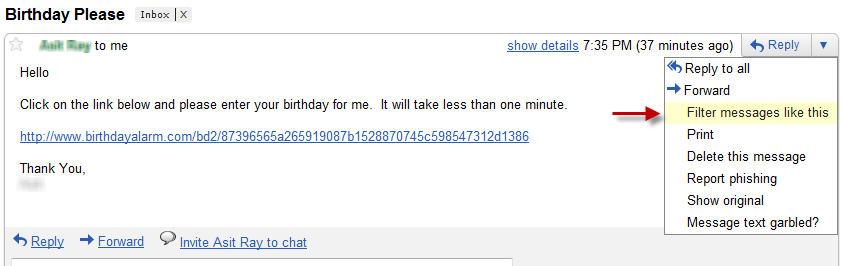
3. Towards the right hand side, click on the small down arrow next to the “Reply” button
4. Choose “Filter messages like this” from the options menu.
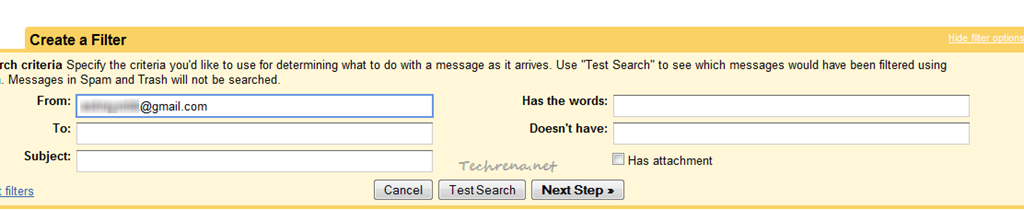
5. The “From” field automatically gets filled by the email address of the sender from whom you received the unwanted mail. Making sure that the field has been filled, click “Next Step” to proceed to the next step.
6. You will see the possible actions for the filtered messages. The options are “Skip the Inbox (Archive it)”, “Mark as read”, “Start it”, “Apply the label: ”, “Forward it to: ”, “Delete it”, “Never send it to Spam”, “Always mark it as important”, “Never mark it as important”. As you to trash all the message from that sender, the best option here would be “Delete it”.
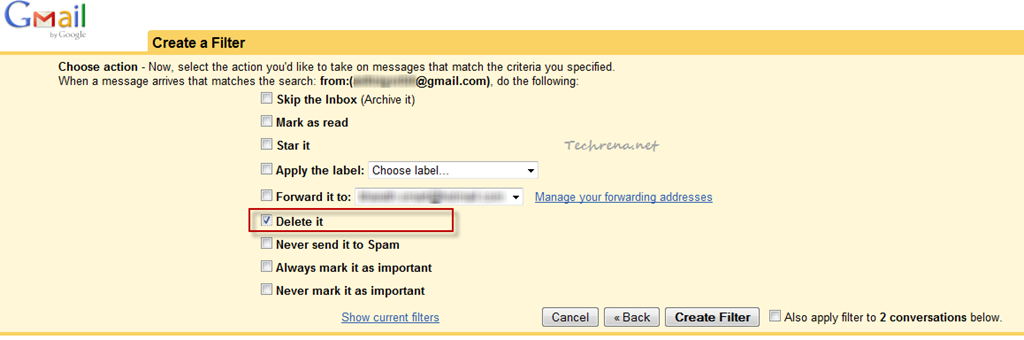
You may also choose to apply the filter to already existing conversations as well. When all is set, click “Create Filter” button.
7. The filter is now successfully configured. Once it is created, review the filter settings from the “Filters” tab under the “Settings”.

All done now! Should the above sender send you any email message in future, it automatically gets deleted without showing up in your inbox. Please note that if the same sender starts from another email address, you need to repeat all the steps starting from the beginning. If you reach a stage where in you loose patience for all the harassment by the sender, you can always complain about it to the Cyber Police in your locality.