
Amazon has just launched a new Kindle Cloud Reader, a tit-for-tat webapp for the Apple’s policy changes to its iTunes App Store, saying that it would be charging 30 p.c of the revenue of every purchase that was made within the app (called in-app purchases). When other popular eBook reader companies like Kobo and Barnes & Noble’s NOOK had to disable the in-app purchases of eBooks and other subscriptions in order to comply with the Apple’s policies, Amazon has found a new workaround to the problem. Using the web based Kindle Cloud Reader users can shop, read and download the subscriptions from the Amazon’s Kindle Store.
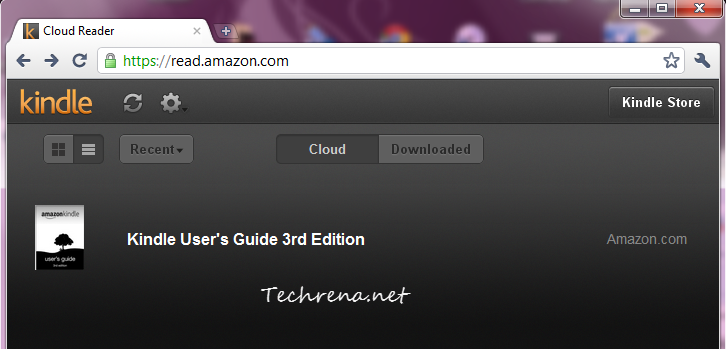
The website is optimized for viewing on iPad (and we know why!) and currently supports Chrome and Safari on your PC, Linux or Mac. It will soon be available for iPhone as well.
How To Use Amazon Kindle Cloud Reader:
If you are using any of the above mentioned browsers, just type http://read.amazon.com in your browser and you will be prompted to install a small plugin to be able to run the web version smoothly. One good thing about the Kindle Cloud Reader is that it can enable HTML5 powered offline reading for all of your Kindle subscriptions. Of course, if you are on a PC, having the standalone Amazon Kindle application is always a better option but then we always want more choices, don’t we?
Kindle Cloud webapp may not be as good as the iPad native app but do we still need to complain having known the fact that it was just created solely for the purpose of getting around the Apple’s App Store rules?
[More at: Amazon]

NICE WEB SITE….BRO…. I’LL SUGGEST MY FRIENDS… KEEP IT UP…GOOD JOB.
aweesome man….very cool….
When i read your blog, i impressed with this. Really your blog is informative.
and this blog is appreciated by <a href=http://www.assotechbusinesstower.com/><b>Assotech Business Cresterra</b></a> | <a href=http://www.assotechbusinesstower.com/><b>Assotech Business Tower</b></a>
You should take part in a contest for one of the best blogs on the web. I will recommend https://techrena.net!
aweesome man
Great….dear.
i really impress
<a href=”http://www.realtyedgeindia.com/3C.php”>3C Lotus Zing Noida</a>
Whats up very nice site!! Guy .. Beautiful .. Amazing .. I’ll bookmark your blog and take the feeds alsoKI’m happy to find numerous useful info right here in the publish, we’d like work out more strategies in this regard, thank you for sharing. . . . . .
I love foregathering useful info, this post has got me even more info! .
I’d need to test with you here. Which is not one thing I normally do! I take pleasure in studying a submit that will make people think. Additionally, thanks for permitting me to remark!
he blog was how do i say it… relevant, finally something that helped me. Thanks
WONDERFUL Post.thanks for share..extra wait .. …
I like this website because so much utile stuff on here :D.
Hi there! I know this is somewhat off topic but I was wondering which blog platform are you using for this website? I’m getting fed up of WordPress because I’ve had issues with hackers and I’m looking at alternatives for another platform. I would be great if you could point me in the direction of a good platform.
Hi there would you mind letting me know which hosting company you’re utilizing? I’ve loaded your blog in 3 different internet browsers and I must say this blog loads a lot quicker then most. Can you recommend a good internet hosting provider at a reasonable price? Thanks, I appreciate it!
Hey! This is my 1st comment here so I just wanted to give a quick shout out and tell you I really enjoy reading your articles. Can you recommend any other blogs/websites/forums that deal with the same subjects? Thank you!
Hi there, You’ve done an incredible job. I will certainly digg it and personally recommend to my friends. I’m confident they’ll be benefited from this website.
Wow! Thank you! I continuously needed to write on my website something like that. Can I include a part of your post to my site?
I keep listening to the reports speak about getting free online grant applications so I have been looking around for the best site to get one. Could you advise me please, where could i find some?
You actually make it seem so easy with your presentation but I find this matter to be really something that I think I would never understand. It seems too complicated and very broad for me. I’m looking forward for your next post, I’ll try to get the hang of it!
I was recommended this website by my cousin. I’m not sure whether this post is written by him as nobody else know such detailed about my problem. You’re wonderful! Thanks!
Heya! I’m at work browsing your blog from my new apple iphone! Just wanted to say I love reading through your blog and look forward to all your posts! Carry on the outstanding work!
Nice blog here! Also your web site a lot up fast! What host are you using? Can I am getting your associate hyperlink for your host? I wish my site loaded up as quickly as yours lol
I think this internet site has some real good information for everyone :D.
wonderful issues altogether, you simply gained a new reader. What could you recommend about your put up that you just made some days in the past? Any positive?
Just wanna admit that this is handy, Thanks for taking your time to write this.
Yeah bookmaking this wasn’t a bad decision outstanding post! .
Wow! This can be one particular of the most helpful blogs We’ve ever arrive across on this subject. Basically Excellent. I’m also a specialist in this topic so I can understand your hard work.
Wow! Thank you! I always wanted to write on my website something like that. Can I include a fragment of your post to my website?
I like the efforts you have put in this, thank you for all the great content.
Howdy! This post could not be written any better! Reading through this post reminds me of my good old room mate! He always kept chatting about this. I will forward this post to him. Pretty sure he will have a good read. Thank you for sharing!
It’s actually a cool and useful piece of info. I’m happy that you just shared this useful info with us. Please stay us informed like this. Thanks for sharing.
Howdy, i read your blog occasionally and i own a similar one and i was just wondering if you get a lot of spam responses? If so how do you prevent it, any plugin or anything you can advise? I get so much lately it’s driving me mad so any help is very much appreciated.
certainly like your website but you need to check the spelling on quite a few of your posts. Several of them are rife with spelling problems and I in finding it very bothersome to inform the reality on the other hand I’ll certainly come back again.
Once I initially commented I clicked the -Notify me when new feedback are added- checkbox and now every time a remark is added I get 4 emails with the same comment. Is there any manner you possibly can remove me from that service? Thanks!
Excellent website. Lots of useful information here. I am sending it to a few buddies ans additionally sharing in delicious. And certainly, thank you to your effort!
I do not even know how I ended up here, but I thought this post was good. I do not know who you are but certainly you are going to a famous blogger if you aren’t already 😉 Cheers!
There is noticeably a bundle to know about this. I assume you made certain nice points in features also.
You are a very smart person!
Wow! Thank you! I permanently wanted to write on my website something like that. Can I include a fragment of your post to my site?
I conceive other website owners should take this web site as an model, very clean and great user pleasant layout.
I am often to blogging and i really appreciate your content. The article has really peaks my interest. I am going to bookmark your site and keep checking for new information.
I carry on listening to the reports lecture about receiving boundless online grant applications so I have been looking around for the top site to get one. Could you tell me please, where could i get some?
Just what I was searching for, thanks for posting.
I cherished up to you will receive performed right here. The sketch is tasteful, your authored material stylish. however, you command get got an shakiness over that you want be delivering the following. ill certainly come further before again as exactly the same just about a lot incessantly inside of case you shield this increase.
Howdy! I simply would like to give an enormous thumbs up for the good data you will have right here on this post. I can be coming back to your blog for extra soon.
Aw, this was a very nice post. In idea I wish to put in writing like this moreover – taking time and precise effort to make an excellent article… however what can I say… I procrastinate alot and in no way seem to get something done.
Really fantastic visual appeal on this website , I’d rate it 10 10.
Do you mind if I quote a few of your posts as long as I provide credit and sources back to your blog? My blog is in the exact same area of interest as yours and my visitors would genuinely benefit from a lot of the information you provide here. Please let me know if this okay with you. Regards!
you have a great blog here! would you like to make some invite posts on my blog?
I cherished up to you’ll receive performed right here. The caricature is attractive, your authored subject matter stylish. nonetheless, you command get bought an impatience over that you wish be turning in the following. unwell surely come more previously once more as exactly the same nearly a lot often inside of case you protect this increase.
Hello, you used to write wonderful, but the last few posts have been kinda boring… I miss your tremendous writings. Past several posts are just a little out of track! come on!
I got good info from your blog
I just like the valuable info you provide on your articles. I’ll bookmark your weblog and test again here frequently. I am moderately certain I’ll be informed a lot of new stuff right right here! Good luck for the next!
Hello there, I found your site via Google even as looking for a comparable matter, your website came up, it seems to be great. I have bookmarked it in my google bookmarks.
Thanks a lot for sharing this with all of us you actually recognise what you are speaking approximately! Bookmarked. Kindly also discuss with my web site =). We can have a link exchange arrangement among us!
I real happy to find this web site on bing, just what I was looking for : D besides bookmarked.
I would like to thank you for the efforts you have put in writing this blog. I’m hoping the same high-grade website post from you in the upcoming also. In fact your creative writing skills has encouraged me to get my own website now. Really the blogging is spreading its wings rapidly. Your write up is a great example of it.
Simply a smiling visitant here to share the love (:, btw great design.
I love the efforts you have put in this, appreciate it for all the great content.
Hello would you mind sharing which blog platform you’re using? I’m looking to start my own blog in the near future but I’m having a hard time making a decision between BlogEngine/Wordpress/B2evolution and Drupal. The reason I ask is because your design seems different then most blogs and I’m looking for something completely unique. P.S Sorry for getting off-topic but I had to ask!
he blog was how do i say it… relevant, finally something that helped me. Thanks
I conceive this site contains some rattling excellent info for everyone. “The individual will always be a minority. If a man is in a minority of one, we lock him up.” by Oliver Wendell Holmes.
Simply wanna comment on few general things, The website style is perfect, the articles is rattling great. “Good judgment comes from experience, and experience comes from bad judgment.” by Barry LePatner.
Heya i’m for the first time here. I came across this board and I to find It really helpful & it helped me out much. I’m hoping to present something back and aid others such as you aided me.
I gotta bookmark this web site it seems invaluable extremely helpful
I’d have to examine with you here. Which is not one thing I usually do! I take pleasure in reading a post that may make folks think. Additionally, thanks for permitting me to comment!
What i do not understood is actually how you’re no longer actually a lot more smartly-preferred than you may be right now. You are so intelligent. You understand therefore considerably when it comes to this matter, made me personally imagine it from so many varied angles. Its like men and women aren’t involved unless it’s one thing to accomplish with Lady gaga! Your personal stuffs nice. Always deal with it up!
I’ve been absent for a while, but now I remember why I used to love this website. Thanks, I’ll try and check back more frequently. How frequently you update your website?
The next time I read a weblog, I hope that it doesnt disappoint me as much as this one. I imply, I know it was my option to read, however I truly thought youd have one thing interesting to say. All I hear is a bunch of whining about something that you could fix should you werent too busy on the lookout for attention.
It’s actually a nice and helpful piece of info. I’m glad that you shared this useful info with us. Please keep us informed like this. Thanks for sharing.
Valuable info. Lucky me I found your site by accident, and I’m shocked why this accident didn’t happened earlier! I bookmarked it.
Good website! I really love how it is simple on my eyes and the data are well written. I’m wondering how I might be notified when a new post has been made. I’ve subscribed to your feed which must do the trick! Have a nice day!
Hi, Neat post. There is a problem with your web site in internet explorer, would test this… IE still is the market leader and a good portion of people will miss your fantastic writing because of this problem.
Great post, you have pointed out some fantastic details , I also think this s a very fantastic website.
This really answered my problem, thanks!
I would like to thank you for the efforts you’ve put in writing this site. I am hoping the same high-grade web site post from you in the upcoming as well. In fact your creative writing abilities has inspired me to get my own site now. Really the blogging is spreading its wings quickly. Your write up is a good example of it.
you are really a good webmaster. The website loading speed is incredible. It seems that you are doing any unique trick. In addition, The contents are masterwork. you’ve done a fantastic job on this topic!
I have read some good stuff here. Definitely value bookmarking for revisiting. I wonder how a lot effort you place to create this kind of magnificent informative site.
Can I just say what a relief to find someone who actually knows what theyre talking about on the internet. You definitely know how to bring an issue to light and make it important. More people need to read this and understand this side of the story. I cant believe youre not more popular because you definitely have the gift.
Very interesting info!Perfect just what I was searching for!
Very nice post. I just stumbled upon your blog and wished to say that I have truly enjoyed browsing your blog posts. After all I’ll be subscribing to your feed and I hope you write again soon!
Nice post. I learn something more challenging on different blogs everyday. It will always be stimulating to read content from other writers and practice a little something from their store. I’d prefer to use some with the content on my blog whether you don’t mind. Natually I’ll give you a link on your web blog. Thanks for sharing.
I was suggested this website by my cousin. I am not sure whether this post is written by him as no one else know such detailed about my difficulty. You are amazing! Thanks!
I appreciate, cause I found exactly what I was looking for. You’ve ended my 4 day long hunt! God Bless you man. Have a nice day. Bye
I’m no longer positive the place you’re getting your information, however great topic. I needs to spend a while studying more or working out more. Thank you for magnificent information I used to be in search of this info for my mission.
Hello my friend! I want to say that this post is amazing, nice written and include almost all important infos. I’d like to look more posts like this .
Real nice design and style and good written content, hardly anything else we require :D.
Hello very nice website!! Guy .. Beautiful .. Amazing .. I’ll bookmark your web site and take the feeds also…I am glad to find numerous useful information here in the post, we’d like work out more strategies on this regard, thank you for sharing. . . . . .
It’s actually a great and helpful piece of info. I’m satisfied that you just shared this helpful information with us. Please keep us informed like this. Thank you for sharing.
As soon as I noticed this web site I went on reddit to share some of the love with them.
When I initially commented I clicked the “Notify me when new comments are added” checkbox and now each time a comment is added I get three emails with the same comment. Is there any way you can remove me from that service? Bless you!
I’m not that much of a online reader to be honest but your sites really nice, keep it up! I’ll go ahead and bookmark your site to come back down the road. Cheers
When I initially commented I clicked the “Notify me when new comments are added” checkbox and now each time a comment is added I get four e-mails with the same comment. Is there any way you can remove people from that service? Cheers!
Hi there, simply became aware of your weblog thru Google, and found that it’s really informative. I am gonna be careful for brussels. I’ll be grateful in the event you continue this in future. Numerous other folks shall be benefited out of your writing. Cheers!
My husband and i were satisfied Albert managed to deal with his survey via the precious recommendations he had using your web page. It’s not at all simplistic to just possibly be offering strategies which other folks might have been selling. And we all discover we have the blog owner to appreciate for this. The main explanations you’ve made, the simple web site menu, the relationships you can aid to instill – it’s got mostly wonderful, and it is leading our son in addition to our family do think the issue is awesome, which is unbelievably vital. Thank you for everything!
Hello! I just wanted to ask if you ever have any issues with hackers? My last blog (wordpress) was hacked and I ended up losing months of hard work due to no backup. Do you have any solutions to stop hackers?
Wow, fantastic blog layout! How long have you been blogging for? you make blogging look easy. The overall look of your web site is excellent, let alone the content!
You are my aspiration, I have few web logs and sometimes run out from post :). “Never mistake motion for action.” by Ernest Hemingway.
Please let me know if you’re looking for a article author for your weblog. You have some really great posts and I think I would be a good asset. If you ever want to take some of the load off, I’d really like to write some articles for your blog in exchange for a link back to mine. Please send me an email if interested. Kudos!
Wow! This blog looks exactly like my old one! It’s on a completely different subject but it has pretty much the same page layout and design. Wonderful choice of colors!
I enjoy your writing style truly loving this site.
The other day, while I was at work, my sister stole my apple ipad and tested to see if it can survive a 30 foot drop, just so she can be a youtube sensation. My iPad is now broken and she has 83 views. I know this is totally off topic but I had to share it with someone!
I gotta favorite this site it seems very useful handy
Very clear website , thankyou for this post.
I was very pleased to find this web-site.I wanted to thanks for your time for this wonderful read!! I definitely enjoying every little bit of it and I have you bookmarked to check out new stuff you blog post.
Rattling nice pattern and great written content, absolutely nothing else we want :D.
It’s really a nice and useful piece of info. I am glad that you shared this useful information with us. Please keep us informed like this. Thanks for sharing.
It’s really a nice and useful piece of information. I’m happy that you just shared this helpful information with us. Please keep us up to date like this. Thanks for sharing.
Thank you for the sensible critique. Me & my neighbor were just preparing to do a little research about this. We got a grab a book from our local library but I think I learned more clear from this post. I am very glad to see such magnificent info being shared freely out there.
Its fantastic as your other articles : D, appreciate it for putting up. “Experience is that marvelous thing that enables you to recognize a mistake when you make it again.” by Franklin P. Jones.