
Consider this scenario: You have both wireless network and wired LAN network available at your place and assume that you have enabled your wireless card and connected to the wired LAN network as well. Which one do you think your Windows will choose? Have you ever thought about it?
If you haven’t, here’s what you should know: There is a default priority order (or network binding order) that would be set for each of your network cards. You might not be knowing about this because it’s so hidden in the windows. You can only see it via a “netstat” command or through some advanced settings in the network connections.
Note: All the following operations are done in Windows 7 and they should also work in Windows Vista as well.
Checking Your Network Cards Priority:
Go to Start menu and type “cmd” in the search box and open cmd.exe from the programs list to open the command prompt.

And then type the following command in the window and press enter:
netstat -rn | more

You will now see “Interface List” in the results as shown (click on the image to view the bigger image):
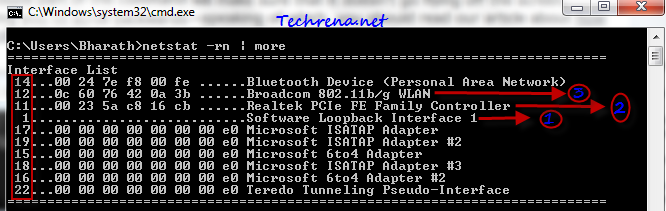
I tried to represent the above result that I got in the command prompt in a text format below:
Interface List

14...00 xx xx xx xx xx ......Bluetooth Device (Personal Area Network)

12...xx xx xx xx xx xx ......Broadcom 802.11b/g WLAN

11...00 xx xx xx xx xx ......Realtek PCIe FE Family Controller

1...........................Software Loopback Interface 1

17...00 00 00 00 00 00 00 e0 Microsoft ISATAP Adapter

19...00 00 00 00 00 00 00 e0 Microsoft ISATAP Adapter #2

15...00 00 00 00 00 00 00 e0 Microsoft 6to4 Adapter

18...00 00 00 00 00 00 00 e0 Microsoft ISATAP Adapter #3

16...00 00 00 00 00 00 00 e0 Microsoft 6to4 Adapter #2

22...00 00 00 00 00 00 00 e0 Teredo Tunneling Pseudo-Interface
As you can see in the above screenshot (highlighted in red), the numbers against the network card interfaces (called “interface metrics”)represent the priority of that network according to Windows. The lower the number, the higher is the priority. In my case Software Loopback 1 (representing Microsoft Loopback adapter) is assigned the highest priority (lowest number #1), followed by Realtek Ethernet adapter (number #11), Wireless LAN adapter (number #12).
So to sum up, my wired network card has been set a higher priority than my wireless network card by Windows. Now let’s assume that my wireless network gives me a faster internet access than what my ISP through the wired network card does. So I’d be keen to connect to the ISP via wireless network card that is offering a faster internet access. But if you are connected to both the wired network & the wireless network, according to the priority assigned, Windows will gives you access to the internet via wired network card by default. So we need to find a way to instruct Windows to let you access the network via wireless network by default, when you are connected to both the wired and wireless networks at the same time. Read on to find out how to do this:
–Warning-: You may not want to change the default priority order unless you see some real problem with how Windows is prioritizing the network interface cards.
Changing Network Cards Priority in Windows:
You can change the network card priority in two ways in Windows:
Method #1:
To start with, I’ll introduce you the easier method first:
1. Go to Control Panel > Network and Internet (View network status and tasks)> Change adapter settings and now you will now be in “Network Connections” window.
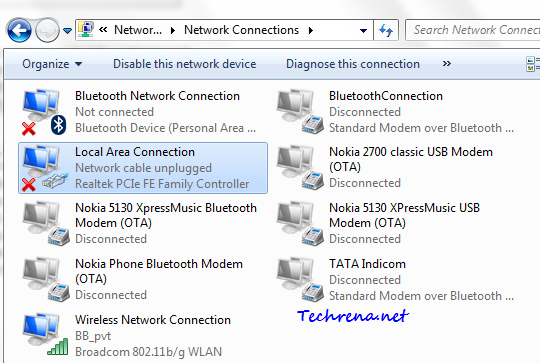
2. Now press Alt button and a hidden menu will appear beneath the location bar.

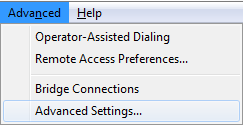
3. Under the Advanced menu, click “Advanced Settings”.
4. You can now see the order of preference in which the connections are accessed by network services.
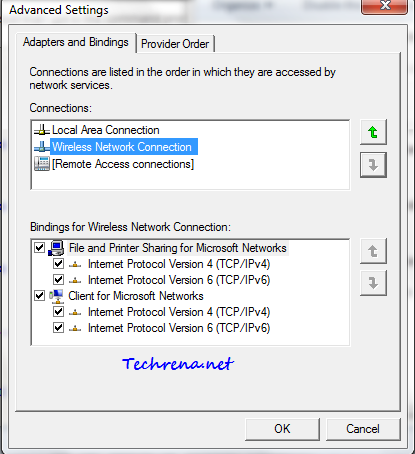
Use “Up” and “Down” buttons to move a network connection either up or down and thus changing the order of priority of connections.
Method #2:
And now let me introduce you the second alternative method, which is a bit laborious when compared to the first one:
1. Go to the “Network Connections” window by following the step 1 as detailed in the above step.
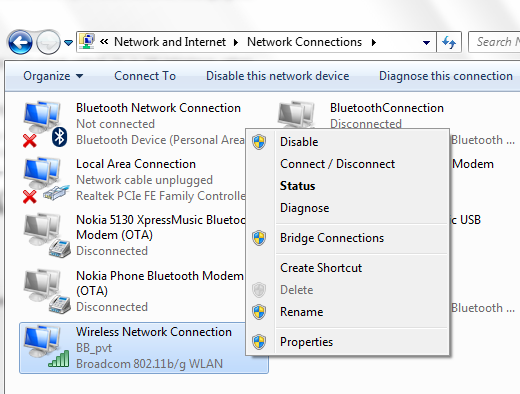
2. Right-click on the network connections for which you want to change the priority order and choose “Properties”. In my case, I wanted to change the interface metric for my wireless network card and hence I will proceed with the changing priority order for Wireless Network Connection under my network connections.
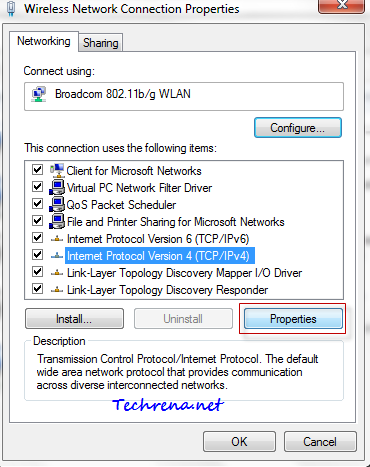
3. Now choose “Internet protocol Version 4 (TCP/IPv4)” and click on “Properties” button.
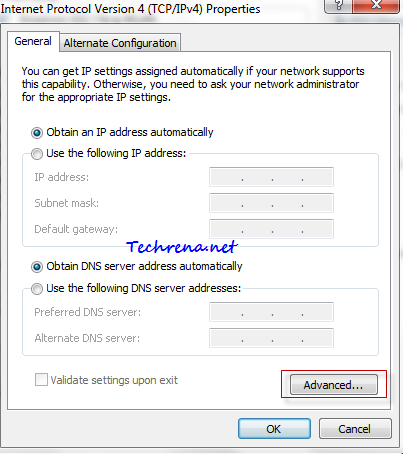
Click on “Advanced..” button in the IPv4 properties window.
4. Look for the “Automatic metric” option in the advanced TCP/IP settings window.
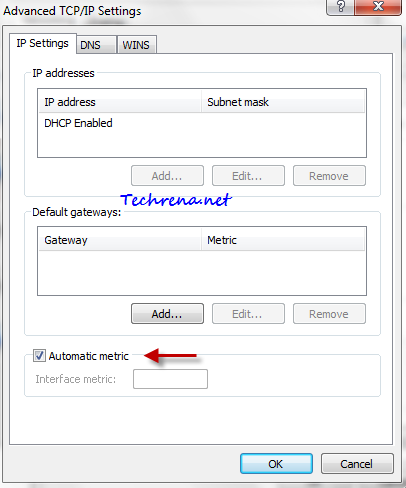
5. Uncheck against the “Automatic metric” option and enter some value other than 1 in the filed against “Interface metric” (as 1 will always be assigned to Microsoft Loopback adapter always) as shown:
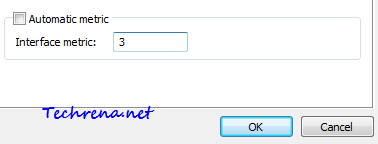
Click OK and close all the windows.
You have now changed the priority of your network card interfaces.

I have a wireless network in my office for Internet access and a wired network for Outlook, VoIp, CRM, etc and I hate to unplug my Ethernet cable to surf the Web. At first when I enable both networks all the connections went to the wired network, I made the changes described in this article and my web browser and MS Outlook worked fine, but my softphone and remote desktop connection still don’t work, I think that maybe these applications are using the wireless connection. There’s a way to configure only my web browser (Currently Chrome) to use the wireless connection and all the other applications to use the wired connection? By the way, I’m using Win 7 Home Premium.
I changed the interface metric priorities in the IPv4 (and IPv6) adapter settings and rebooted my computer but the changes do not show up in the “netstat” via the command window (but the changes remain in the IPv4 and IPv6 sections of the adapter settings). I have tried different values but nothing seems to work. I am running Windows 7. Also, from other posts on other sites, other people are experiencing the same issue with the second method. Any suggestions? Thanks.
It seems to have no effect. Is it needed to restart windows?
In that case it looses its main utility, isn’t it?
Ray, in my experience you should specify a fixed IP address to the adapter with lower priority and DHCP for the adapter with the highest priority. I did it in that way and worked. My main problem was with the web browsing and with this little trick I can have both connection working without problems (WiFi connection for internet and a local area connection for my office LAN.
I’ve an .NET application that needs to change on the network adapters, I’ll wondering if there is a way to doing automatically.
Thanks
Thx mate, it worked perfectly 😀
It doesn’t work for me either way, the Wireless still gets connected first. Any suggestions?
..meaning my Wireless gets connected first by W7, despite me a) having put Local Area Connection at the top, and then b) setting the Ethernet card with a higher priority than the Wireless card, the Wireless always connects first. The only way to get my Ethernet connection on is to manually ‘disconnect’ the Wireless connection! What a strange world that Microsoft allows such clumsiness in its software
Thanks a lot, this is exactly what I was looking for!
I have changed metric and it was working fine but after restart of pc again same problem even metric settings are there in interface but still same problem. Please suggest.
Is there a way to push this to multiple machines? GPO, Regedit, script or batch file?
Method 1 does not work. It is a common misconception that changing the binding order of the network interfaces changes its priority, it does not. If you want to do this use method 2 and change the interfaces metric, dont forget to restart your computer after the changes.
An easy way to find out the priority is to run “netstat -rn | more”. The lower the number, the higher the priority (ie will be used first if present).
Windows 7 will always prioritise wired over wireless unless you say otherwise.
You can also ctrl+alt+del and watch the networking tab as you browse internet, access network etc to see which is being used.
The Norwegian spared his senior players the 6,000-mile spherical-trip to Kazakhstan, took a squad filled with academy graduates and selected an XI with an average age of twenty-two years and 26 days – the youngest fielded in European competition. Applications for formal business visas should be submitted in advance, with approval in three to six days. It’s exhausting to predict a particular quantity, considering the conflict-related uncertainty, but as soon as the borders are open, we count on to see a two-way move of Ukrainian singles to and from the nation. 1. First, you need to talk about dwelling in her nation with your girlfriend. Russian ladies assist their husbands with no judgement or unsolicited advice, and you can at all times belief your wife even when you’re away. Our marriage agency AU COEUR DE L’EST affords a customized, high quality service for courting and marriages with Russian and Ukrainian ladies. SofiaDate offers free Ukrainian dating site perks like looking local singles, plus premium features like video calls, virtual gifts, and live chat. The city’s cosmopolitan ambiance makes it simple to attach with worldwide singles, especially at cultural festivals or occasions centered round arts and leisure. Krystyna focuses on International relationship, which involves educating men communication abilities in a cross-cultural surroundings.
The Palestinians have all the time opposed Israel’s presence in these areas and wish them to be part of a future impartial state, something backed by the overwhelming majority of the international neighborhood. If you want to see his or her face at the tip of the day and perceive higher what they may feel, you must find your love in Europe with YESDates. No matter what sort of relationship you want to build long-term, quick-term, or critical goals, it is important to speak accurately on a courting site to attain success. If the devoted teams really feel somebody shouldn’t be genuine or would not use the positioning appropriately they aren’t allowed to join. The site is straightforward however effective, so if you are a newcomer to the world of online courting, you will certainly take pleasure in this place. Start real conversations and join with girls from all around the charmdate.com world. Or you possibly can simply set up your profile and get Russian women dating to get in touch with you. Interpreting Services – Ukrainian ladies are very good, and most of them understand how to talk English. Ukrainian celebrations of holidays like New Year may involve traditions and expectations very totally different from your personal.
A demonstration of new Style, meaning Julian calendar with a start of year adjustment. Probably the most advantageous thing is that you just will pay solely once you actively use the site, and there is no monthly subscription. Ease of use is one other crucial issue. Most platforms use advanced encryption to guard user data, while verification processes minimize scams. Russian Foreign Ministry spokeswoman Maria Zakharova denounced the assault and referred to as the protestors “younger neo-Nazis”, and demanded Poland to organize with out delay the wreath-laying ceremony whereas offering full security. Regardless, you’re younger and never, how do you glimpse. Are you a connoisseur of Belgian beers or a historical past buff fascinated by Ancient Greece? These tribes, the Slavs and the Antes, are usually not dominated by one particular person, but since historic instances they have lived within the folks’s rule (democracy), and due to this fact their happiness and unhappiness in life is considered a common trigger. In case you shave, try this too – simply to have a well-groomed appearance. She’ll have your again always. Obviously, European brides for marriage have 1000’s of possible personality traits, and even in the event that they may be perfect companions for some men, this doesn’t essentially mean a regular European woman shall be 100% excellent for you.
More men grow to be interested by Slavic brides annually, and it is admittedly convenient that you can meet your future associate on-line. You’re not wasting nights hoping to bump into Ms. Right; you’re searching 1000’s of foreign mail order brides who are already down to connect. Besides create an in depth and distinctive profile will mean you can fairly a bit once you start down. Most of them date with function and they will inform instantly if you’re not serious. This conversation can stop many potential misunderstandings later. In Taylor, R.E.; Bar-Yosef, Ofer (eds.). Taylor, R.E. (1987). Radiocarbon Dating. Walnut Creek, California: Left Coast Press. Radiocarbon Dating. Walnut Creek, California: Left Coast Press. Radiocarbon Dating. London: British Museum Press. Radiocarbon. University of Arizona. Berkeley, California: University of California Press. Princeton: Princeton University Press. College Station, Texas: Texas A&M University Press. Encyclopedia of worldwide Change: Environmental Change and Human Society, Volume 1. Oxford: Oxford University Press. From the Pleistocene to the Holocene: Human Organization and Cultural Transformations in Prehistoric North America. Don’t rush to mattress when you meet offline.