

Facebook has just announced the availability of HTTPS/SSL all the time on the Facebook. If you enable HTTPS mode, all the data beginning from the password you type at the login page would be encrypted when it travels between the browser and the Facebook server, offering a more sophisticated security for your stay on Facebook. HTTPS mode isn’t new, you might have seen this while doing any transactions on the internet. A similar HTTPS/SSL mode is also optional on Gmail and Hotmail.
# Who Should Consider HTTPS Secure Mode For Facebook?
Facebook suggests that if you frequently use your account at public internet access enabled places coffee shops, restaurants, airports, libraries and schools etc.
# How To Enable The HTTPS Mode In Facebook?
Open your account settings page and click on the “Account Security” section. You will find the “Secure Browsing (https)” option and check against “Browser Facebook on a secure connection (https) whenever possible” and click Save.
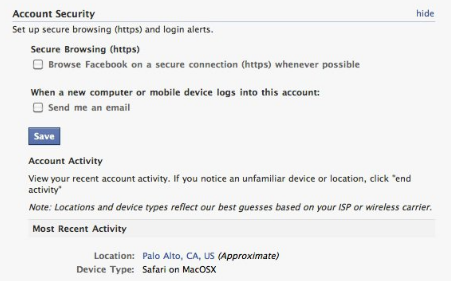
Can’t find the option in your account? You may have to wait! Facebook will rollout the option for all the users in the coming weeks starting from today.
When you enable the HTTPS mode and log back into the Facebook, you will see this in the address bar.

# What Are The Downsides?
While you press hard for enabling more secure HTTPS mode, you might have to compromise on the page load speeds part. Facebook alerts users that enabling encryptions mode means that pages take longer than usual time to load. Also many third-party applications are currently not supported in HTTPS mode.
# Social Authentication
Besides this, Facebook has one more interesting feature announcement about using Social authentication. Facebook is now testing this feature which now lets users to authenticate by using pictures of their friends (like the one shown in the screenshot):
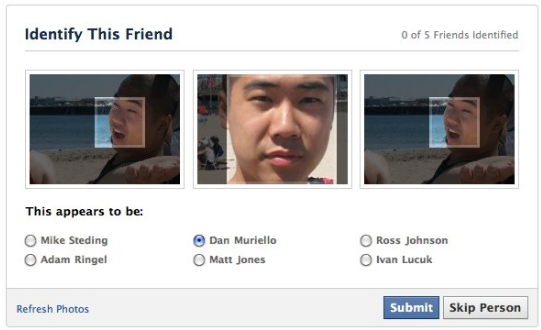
[Via] The Facebook Blog

References:
High limit blackjack
References:
https://berntsen-mcleod-4.thoughtlanes.net/aussie-millions-2026-the-ultimate-player-guide
References:
Bodybuilding stacks that work
References:
https://git.koppa.pro/kiaralantz3888
References:
Bedste danske casinoer med høj RTP
References:
https://git.wisder.net/janessaseaborn
References:
Poker Schenefeld the-stardust-casino.online-spielhallen.de
Thanks for all your efforts that you have put in this. very interesting info .
Hello there, You’ve done a fantastic job. I’ll certainly digg it and personally suggest to my friends. I am confident they will be benefited from this website.
Valuable info. Lucky me I found your site by accident, and I’m shocked why this accident did not happened earlier! I bookmarked it.
I love the efforts you have put in this, thanks for all the great content.
Thank you, I have just been looking for information about this topic for ages and yours is the greatest I’ve discovered till now. But, what about the conclusion? Are you sure about the source?
I conceive other website proprietors should take this site as an example , very clean and superb user friendly layout.
Wow that was odd. I just wrote an incredibly long comment but after I clicked submit my comment didn’t show up. Grrrr… well I’m not writing all that over again. Regardless, just wanted to say fantastic blog!
This is very attention-grabbing, You’re an excessively skilled blogger. I have joined your rss feed and stay up for looking for more of your fantastic post. Additionally, I have shared your web site in my social networks!
Hmm is anyone else having problems with the images on this blog loading? I’m trying to find out if its a problem on my end or if it’s the blog. Any feedback would be greatly appreciated.
Thanks for this post, I am a big big fan of this internet site would like to go on updated.
Hi there, just became alert to your blog through Google, and found that it is truly informative. I’m gonna watch out for brussels. I’ll appreciate if you continue this in future. A lot of people will be benefited from your writing. Cheers!
I was suggested this web site by my cousin. I am not sure whether this post is written by him as no one else know such detailed about my trouble. You’re amazing! Thanks!
Some really nice stuff on this internet site, I enjoy it.
This is very interesting, You’re an overly skilled blogger. I have joined your feed and sit up for in quest of extra of your magnificent post. Also, I’ve shared your web site in my social networks!
Can I simply say what a relief to seek out someone who really knows what theyre speaking about on the internet. You undoubtedly know how to carry a problem to mild and make it important. More individuals need to learn this and understand this facet of the story. I cant consider youre no more in style since you definitely have the gift.
My developer is trying to convince me to move to .net from PHP. I have always disliked the idea because of the costs. But he’s tryiong none the less. I’ve been using Movable-type on a number of websites for about a year and am anxious about switching to another platform. I have heard very good things about blogengine.net. Is there a way I can transfer all my wordpress content into it? Any help would be really appreciated!
This internet site is my inspiration , really superb style and design and perfect content.
I loved as much as you’ll receive carried out right here. The sketch is tasteful, your authored subject matter stylish. nonetheless, you command get got an impatience over that you wish be delivering the following. unwell unquestionably come more formerly again since exactly the same nearly very often inside case you shield this increase.
Hey there, You’ve performed an excellent job. I’ll definitely digg it and in my view suggest to my friends. I’m sure they’ll be benefited from this web site.
I’ve been browsing online greater than 3 hours as of late, yet I never found any interesting article like yours. It is pretty price enough for me. In my opinion, if all webmasters and bloggers made just right content as you probably did, the internet can be a lot more helpful than ever before. “Now I see the secret of the making of the best persons.” by Walt Whitman.
Generally I do not read article on blogs, but I wish to say that this write-up very compelled me to take a look at and do so! Your writing taste has been amazed me. Thank you, very nice post.
I have not checked in here for a while as I thought it was getting boring, but the last few posts are good quality so I guess I will add you back to my daily bloglist. You deserve it my friend 🙂
Helpful information. Lucky me I found your site unintentionally, and I am shocked why this coincidence didn’t took place in advance! I bookmarked it.
There is noticeably a bundle to know about this. I assume you made certain nice points in features also.
Very interesting details you have observed, thanks for posting. “These days an income is something you can’t live without–or within.” by Tom Wilson.
I am really loving the theme/design of your website. Do you ever run into any web browser compatibility issues? A couple of my blog audience have complained about my site not operating correctly in Explorer but looks great in Firefox. Do you have any solutions to help fix this issue?
Some genuinely superb posts on this site, thank you for contribution. “Better shun the bait, than struggle in the snare.” by John Dryden.
I am impressed with this website , real I am a fan.
I like this post, enjoyed this one appreciate it for putting up.
Some times its a pain in the ass to read what people wrote but this web site is very user pleasant! .
I’ve been surfing online greater than 3 hours nowadays, yet I by no means discovered any fascinating article like yours. It’s beautiful worth enough for me. Personally, if all webmasters and bloggers made good content material as you did, the internet will likely be much more useful than ever before.
Great beat ! I would like to apprentice while you amend your web site, how can i subscribe for a weblog web site? The account helped me a acceptable deal. I were tiny bit familiar of this your broadcast offered vivid transparent idea
Rattling nice layout and good content material, practically nothing else we need :D.
Very interesting info !Perfect just what I was searching for!
I am also writing to make you understand what a useful encounter my daughter experienced using the blog. She picked up lots of pieces, with the inclusion of what it is like to have a great helping style to make the rest completely know certain extremely tough things. You actually exceeded readers’ expectations. Many thanks for churning out those priceless, safe, explanatory and in addition cool guidance on this topic to Tanya.
This really answered my problem, thank you!
It’s really a great and useful piece of information. I am satisfied that you shared this useful info with us. Please stay us up to date like this. Thanks for sharing.
I’ll immediately grasp your rss as I can’t find your email subscription link or newsletter service. Do you have any? Please let me realize in order that I could subscribe. Thanks.
Just want to say your article is as astounding. The clearness in your post is simply spectacular and i could assume you’re an expert in this subject. Well with your permission allow me to grab your feed to keep up to date with imminent post. Thanks a million and please keep up the rewarding work.
I savour, cause I found exactly what I used to be looking for. You’ve ended my four day long hunt! God Bless you man. Have a nice day. Bye
Thank you for the sensible critique. Me and my neighbor were just preparing to do some research about this. We got a grab a book from our area library but I think I learned more from this post. I am very glad to see such excellent information being shared freely out there.
When I initially commented I clicked the “Notify me when new comments are added” checkbox and now each time a comment is added I get four emails with the same comment. Is there any way you can remove me from that service? Thank you!
I really like your writing style, wonderful information, regards for posting :D. “You can complain because roses have thorns, or you can rejoice because thorns have roses.” by Ziggy.
Thanks for any other informative blog. Where else could I am getting that kind of information written in such an ideal method? I’ve a mission that I am just now running on, and I have been at the look out for such information.
Have you ever thought about including a little bit more than just your articles? I mean, what you say is fundamental and everything. But imagine if you added some great images or video clips to give your posts more, “pop”! Your content is excellent but with pics and clips, this blog could certainly be one of the very best in its niche. Awesome blog!
Good day very cool website!! Guy .. Beautiful .. Wonderful .. I’ll bookmark your web site and take the feeds additionallyKI am happy to find so many useful information here within the post, we’d like develop more techniques in this regard, thanks for sharing. . . . . .
I like this post, enjoyed this one thank you for putting up. “Abortion is advocated only by persons who have themselves been born.” by Ronald Reagan.
I do agree with all the ideas you have presented in your post. They are very convincing and will certainly work. Still, the posts are too short for newbies. Could you please extend them a bit from next time? Thanks for the post.
It’s a shame you don’t have a donate button! I’d certainly donate to this brilliant blog! I guess for now i’ll settle for book-marking and adding your RSS feed to my Google account. I look forward to brand new updates and will share this blog with my Facebook group. Talk soon!
Once I initially commented I clicked the -Notify me when new feedback are added- checkbox and now every time a remark is added I get four emails with the identical comment. Is there any manner you may remove me from that service? Thanks!
Together with almost everything which appears to be developing within this particular area, your viewpoints are actually fairly radical. Even so, I beg your pardon, but I do not give credence to your whole idea, all be it refreshing none the less. It seems to everybody that your opinions are not totally justified and in actuality you are yourself not even completely confident of your assertion. In any event I did take pleasure in examining it.
I was very pleased to find this web-site.I wanted to thanks for your time for this wonderful read!! I definitely enjoying every little bit of it and I have you bookmarked to check out new stuff you blog post.
Super-Duper website! I am loving it!! Will come back again. I am taking your feeds also
Well I sincerely enjoyed reading it. This post provided by you is very constructive for accurate planning.
Excellent goods from you, man. I have understand your stuff previous to and you are just too fantastic. I really like what you have acquired here, certainly like what you’re stating and the way in which you say it. You make it entertaining and you still take care of to keep it wise. I cant wait to read far more from you. This is really a terrific site.
I’ve been absent for a while, but now I remember why I used to love this web site. Thank you, I will try and check back more frequently. How frequently you update your site?
I am not sure where you are getting your info, but great topic. I needs to spend some time learning more or understanding more. Thanks for excellent info I was looking for this info for my mission.
I see something really interesting about your web blog so I saved to bookmarks.
Hi there just wanted to give you a quick heads up. The words in your post seem to be running off the screen in Internet explorer. I’m not sure if this is a formatting issue or something to do with internet browser compatibility but I figured I’d post to let you know. The layout look great though! Hope you get the issue resolved soon. Cheers
Just a smiling visitor here to share the love (:, btw outstanding design.
Hello! I just would like to give a huge thumbs up for the great info you have here on this post. I will be coming back to your blog for more soon.
I went over this web site and I conceive you have a lot of fantastic information, saved to bookmarks (:.
I’ll right away clutch your rss as I can’t to find your email subscription link or e-newsletter service. Do you have any? Please let me know in order that I could subscribe. Thanks.
It’s the best time to make some plans for the future and it is time to be happy. I’ve read this post and if I could I desire to suggest you some interesting things or tips. Maybe you could write next articles referring to this article. I desire to read more things about it!
Hi there! This post couldn’t be written any better! Reading through this post reminds me of my previous room mate! He always kept talking about this. I will forward this article to him. Pretty sure he will have a good read. Thank you for sharing!
Undeniably consider that that you said. Your favorite reason appeared to be on the internet the easiest factor to understand of. I say to you, I definitely get irked at the same time as people consider issues that they plainly do not know about. You controlled to hit the nail upon the top and also outlined out the entire thing with no need side effect , people can take a signal. Will probably be again to get more. Thank you
Your style is so unique compared to many other people. Thank you for publishing when you have the opportunity,Guess I will just make this bookmarked.
Yay google is my world beater aided me to find this outstanding website ! .
Today, while I was at work, my cousin stole my iPad and tested to see if it can survive a twenty five foot drop, just so she can be a youtube sensation. My apple ipad is now destroyed and she has 83 views. I know this is totally off topic but I had to share it with someone!
I have learn a few excellent stuff here. Definitely price bookmarking for revisiting. I wonder how so much attempt you put to make one of these great informative website.
Excellent read, I just passed this onto a friend who was doing a little research on that. And he just bought me lunch since I found it for him smile So let me rephrase that: Thanks for lunch!
I wanted to post you that bit of note to say thanks yet again for all the pleasant solutions you have provided here. It was certainly surprisingly generous with people like you to give openly just what many of us could have marketed as an ebook to get some bucks for their own end, especially seeing that you might well have done it if you considered necessary. Those solutions as well served to be a good way to be certain that some people have the identical dream the same as my personal own to figure out a whole lot more in terms of this matter. I am sure there are numerous more enjoyable instances up front for those who view your website.
Hi there! I know this is kind of off topic but I was wondering if you knew where I could locate a captcha plugin for my comment form? I’m using the same blog platform as yours and I’m having difficulty finding one? Thanks a lot!
I have read some excellent stuff here. Definitely worth bookmarking for revisiting. I surprise how a lot effort you put to create this kind of great informative site.
You actually make it appear really easy together with your presentation but I in finding this topic to be really one thing that I think I’d by no means understand. It kind of feels too complicated and very broad for me. I am taking a look forward for your next publish, I will try to get the hang of it!
I’d always want to be update on new content on this site, saved to bookmarks! .
Wohh exactly what I was looking for, thankyou for putting up.
I really appreciate this post. I’ve been looking everywhere for this! Thank goodness I found it on Bing. You’ve made my day! Thank you again
I think this site holds some really excellent info for everyone. “Few friendships would survive if each one knew what his friend says of him behind his back.” by Blaise Pascal.
I was wondering if you ever thought of changing the page layout of your site? Its very well written; I love what youve got to say. But maybe you could a little more in the way of content so people could connect with it better. Youve got an awful lot of text for only having one or 2 pictures. Maybe you could space it out better?
I keep listening to the news broadcast talk about getting free online grant applications so I have been looking around for the finest site to get one. Could you advise me please, where could i acquire some?
Hello There. I found your blog using msn. This is a very well written article. I will make sure to bookmark it and return to read more of your helpful info. Thanks for the post. I will certainly comeback.
Woh I enjoy your blog posts, saved to bookmarks! .
There are definitely a lot of particulars like that to take into consideration. That may be a nice level to bring up. I supply the thoughts above as general inspiration however clearly there are questions like the one you bring up where crucial thing shall be working in sincere good faith. I don?t know if best practices have emerged around issues like that, but I am positive that your job is clearly recognized as a good game. Each boys and girls feel the impression of only a moment’s pleasure, for the rest of their lives.
Thanks for all of your labor on this blog. My mum take interest in doing investigation and it is easy to understand why. Many of us notice all of the powerful manner you deliver precious steps on the website and even recommend contribution from visitors about this theme then our favorite child has always been learning a whole lot. Take pleasure in the rest of the year. You are always carrying out a good job.
You have observed very interesting points! ps decent web site.
This is really interesting, You are an overly professional blogger. I’ve joined your feed and look forward to seeking more of your excellent post. Additionally, I’ve shared your website in my social networks!
I’m still learning from you, as I’m trying to achieve my goals. I absolutely enjoy reading all that is posted on your site.Keep the posts coming. I loved it!
I haven’t checked in here for some time as I thought it was getting boring, but the last several posts are great quality so I guess I will add you back to my daily bloglist. You deserve it my friend 🙂
An impressive share, I just given this onto a colleague who was doing a little analysis on this. And he in fact purchased me breakfast because I found it for him.. smile. So let me reword that: Thnx for the deal with! But yeah Thnkx for spending the time to discuss this, I feel strongly about it and love reading more on this topic. If doable, as you grow to be expertise, would you mind updating your weblog with extra details? It’s extremely helpful for me. Big thumb up for this weblog publish!
I went over this website and I think you have a lot of great information, saved to my bookmarks (:.
Great goods from you, man. I’ve take into accout your stuff prior to and you’re just extremely magnificent. I actually like what you’ve received here, really like what you are stating and the way in which you assert it. You’re making it entertaining and you continue to care for to stay it wise. I can’t wait to learn far more from you. This is really a great website.
Nice read, I just passed this onto a colleague who was doing some research on that. And he just bought me lunch since I found it for him smile Therefore let me rephrase that: Thank you for lunch!
Hi, I think your site might be having browser compatibility issues. When I look at your blog site in Ie, it looks fine but when opening in Internet Explorer, it has some overlapping. I just wanted to give you a quick heads up! Other then that, very good blog!
Well I sincerely enjoyed reading it. This post offered by you is very helpful for proper planning.
WONDERFUL Post.thanks for share..more wait .. …
It’s really a great and helpful piece of information. I am satisfied that you just shared this helpful information with us. Please stay us informed like this. Thanks for sharing.
I real thankful to find this internet site on bing, just what I was looking for : D likewise saved to favorites.
Do you have a spam issue on this site; I also am a blogger, and I was wanting to know your situation; many of us have developed some nice practices and we are looking to swap techniques with others, why not shoot me an email if interested.
Yay google is my king assisted me to find this outstanding internet site! .
F*ckin’ awesome issues here. I’m very happy to peer your article. Thank you a lot and i’m having a look ahead to contact you. Will you please drop me a e-mail?
naturally like your website but you need to check the spelling on several of your posts. Several of them are rife with spelling issues and I find it very bothersome to tell the truth nevertheless I’ll definitely come back again.
Thanks – Enjoyed this post, how can I make is so that I get an email whenever you make a new post?
Hi there! I know this is kind of off topic but I was wondering which blog platform are you using for this site? I’m getting sick and tired of WordPress because I’ve had problems with hackers and I’m looking at options for another platform. I would be awesome if you could point me in the direction of a good platform.
Some truly wondrous work on behalf of the owner of this internet site, utterly great subject material.
Greetings! Very helpful advice on this article! It is the little changes that make the biggest changes. Thanks a lot for sharing!
Everything is very open and very clear explanation of issues. was truly information. Your website is very useful. Thanks for sharing.
Hmm it appears like your site ate my first comment (it was super long) so I guess I’ll just sum it up what I had written and say, I’m thoroughly enjoying your blog. I as well am an aspiring blog blogger but I’m still new to the whole thing. Do you have any recommendations for rookie blog writers? I’d certainly appreciate it.
Definitely, what a fantastic blog and instructive posts, I will bookmark your website.Have an awsome day!
Attractive component of content. I simply stumbled upon your web site and in accession capital to assert that I get actually enjoyed account your blog posts. Anyway I’ll be subscribing in your augment or even I success you get right of entry to consistently quickly.
As I web-site possessor I believe the content material here is rattling wonderful , appreciate it for your efforts. You should keep it up forever! Good Luck.
Howdy! Do you use Twitter? I’d like to follow you if that would be ok. I’m absolutely enjoying your blog and look forward to new posts.
But a smiling visitant here to share the love (:, btw outstanding style and design. “Competition is a painful thing, but it produces great results.” by Jerry Flint.
I wanted to thank you for this great read!! I definitely enjoying every little bit of it I have you bookmarked to check out new stuff you post…
Hi! Quick question that’s entirely off topic. Do you know how to make your site mobile friendly? My site looks weird when viewing from my iphone 4. I’m trying to find a template or plugin that might be able to fix this problem. If you have any recommendations, please share. Thank you!
Your house is valueble for me. Thanks!…
Hello to every body, it’s my first visit of this webpage; this website includes amazing and actually excellent
information designed for visitors.
I’ve recently started a website, the information you provide on this website has helped me tremendously. Thank you for all of your time & work.
Hello. impressive job. I did not anticipate this. This is a fantastic story. Thanks!
You should take part in a contest for one of the best blogs on the web. I will recommend this site!
I simply couldn’t leave your website before suggesting that I really loved the usual info a person supply to your guests? Is gonna be back frequently to inspect new posts
Great write-up, I am normal visitor of one’s blog, maintain up the excellent operate, and It’s going to be a regular visitor for a long time.
Magnificent beat ! I would like to apprentice while you amend your site, how can i subscribe for a blog site? The account aided me a acceptable deal. I had been tiny bit acquainted of this your broadcast provided bright clear concept
I am not sure where you’re getting your information, but great topic. I needs to spend some time learning more or understanding more. Thanks for magnificent information I was looking for this info for my mission.
Thank you, I have just been searching for info about this topic for ages and yours is the greatest I’ve discovered till now. But, what about the bottom line? Are you sure about the source?
You are my inhalation, I have few web logs and infrequently run out from to brand.
I am glad to be a visitor of this pure web site! , thanks for this rare info ! .
I am continuously invstigating online for posts that can benefit me. Thx!
Howdy! This post couldn’t be written any better! Reading through this post reminds me of my previous room mate! He always kept talking about this. I will forward this page to him. Fairly certain he will have a good read. Many thanks for sharing!
시알리스의 성분인 타다라필과 효과, 지속시간, 5mg·10mg·20mg 차이를 알아보세요. 복용 방식, 부작용, 함께 복용하면 안 되는 약, 처방과 가격 확인 방법을 정리했습니다.
팔팔정의 성분과 효과, 50mg·100mg 차이, 복용 시간과 부작용을 확인하세요. 처방 및 가격 확인 방법, 함께 복용하면 안 되는 약, 자주 묻는 질문까지 안내합니다.
I conceive this website holds some rattling good info for everyone :D.
I like reading and I conceive this website got some genuinely utilitarian stuff on it! .
Does your blog have a contact page? I’m having a tough time locating it but, I’d like to shoot you an e-mail. I’ve got some recommendations for your blog you might be interested in hearing. Either way, great site and I look forward to seeing it grow over time.
You are my breathing in, I own few web logs and occasionally run out from to post : (.
Keep functioning ,great job!
I like this blog so much, bookmarked.
Loving the info on this web site, you have done outstanding job on the content.
Exactly what I was searching for, appreciate it for posting.
You really make it appear so easy along with your presentation but I in finding this topic to be actually one thing that I feel I would never understand. It kind of feels too complex and very extensive for me. I am taking a look ahead on your subsequent publish, I’ll attempt to get the grasp of it!
I precisely had to say thanks once again. I do not know the things that I would’ve made to happen without the actual aspects revealed by you relating to such industry. It has been a very daunting setting in my position, nevertheless observing the very expert way you treated the issue made me to jump with gladness. I’m just thankful for the guidance and have high hopes you are aware of an amazing job that you are getting into training the mediocre ones with the aid of your blog. Most probably you haven’t met any of us.
I am thankful that I discovered this web site, precisely the right info that I was looking for! .
강남구구단 방문을 준비하고 있다면 가격 구성, 이용 방식, 예약 절차와 위치 확인사항을 살펴보세요. 인원·시간에 따른 상담 항목과 자주 묻는 질문을 한곳에 정리했습니다.
The very heart of your writing whilst appearing agreeable initially, did not really settle very well with me personally after some time. Somewhere within the paragraphs you managed to make me a believer but just for a while. I nevertheless have a problem with your leaps in assumptions and one might do well to fill in all those gaps. In the event that you can accomplish that, I will undoubtedly be impressed.
Nice post. I be taught something more challenging on different blogs everyday. It is going to all the time be stimulating to learn content material from other writers and follow just a little something from their store. I’d favor to use some with the content on my weblog whether or not you don’t mind. Natually I’ll provide you with a link on your net blog. Thanks for sharing.
Great website. Lots of useful info here. I’m sending it to a few friends ans also sharing in delicious. And of course, thanks for your sweat!
I real delighted to find this web site on bing, just what I was searching for : D too saved to my bookmarks.
Do you have a spam issue on this site; I also am a blogger, and I was wanting to know your situation; we have developed some nice practices and we are looking to swap solutions with other folks, please shoot me an e-mail if interested.
I like this website very much so much fantastic information.
You have brought up a very good details, thanks for the post.
I really appreciate you for sharing such interesting post. I really like your website. Thanks again for providing a space for me to comment on your blog post. I hope more useful content from you in the coming days.
Some genuinely nice and useful info on this internet site, also I believe the layout contains wonderful features.
Write more, thats all I have to say. Literally, it seems as though you relied on the video to make your point. You definitely know what youre talking about, why throw away your intelligence on just posting videos to your blog when you could be giving us something enlightening to read?
I conceive other website owners should take this web site as an model, very clean and superb user genial pattern.
It’s arduous to seek out knowledgeable individuals on this subject, however you sound like you know what you’re speaking about! Thanks
Woh I enjoy your content, saved to my bookmarks! .
I’ll right away clutch your rss feed as I can’t find your email subscription link or e-newsletter service. Do you have any? Please permit me know so that I may subscribe. Thanks.
Great remarkable issues here. I’m very glad to see your post. Thank you a lot and i’m having a look forward to contact you. Will you please drop me a mail?
Enjoyed examining this, very good stuff, regards. “What the United States does best is to understand itself. What it does worst is understand others.” by Carlos Fuentes.
As a Newbie, I am always browsing online for articles that can aid me. Thank you
I really appreciate this post. I’ve been looking everywhere for this! Thank goodness I found it on Bing. You’ve made my day! Thank you again
It’s really a cool and useful piece of info. I am glad that you shared this helpful info with us. Please keep us informed like this. Thanks for sharing.
Wonderful post however , I was wondering if you could write a litte more on this subject? I’d be very thankful if you could elaborate a little bit further. Bless you!
Hi, Neat post. There’s an issue with your site in internet explorer, may check this… IE nonetheless is the marketplace chief and a good section of people will miss your wonderful writing because of this problem.
My brother suggested I might like this website. He was entirely right. This post truly made my day. You can not imagine just how much time I had spent for this information! Thanks!
Hi there! This post couldn’t be written any better! Reading through this post reminds me of my previous room mate! He always kept talking about this. I will forward this article to him. Pretty sure he will have a good read. Thank you for sharing!
Excellent read, I just passed this onto a friend who was doing a little research on that. And he just bought me lunch since I found it for him smile So let me rephrase that: Thanks for lunch! “Without friends no one would choose to live, though he had all other goods.” by Aristotle.
I really appreciate this post. I’ve been looking all over for this! Thank goodness I found it on Bing. You’ve made my day! Thx again!
Hey there, I think your blog might be having browser compatibility issues. When I look at your website in Ie, it looks fine but when opening in Internet Explorer, it has some overlapping. I just wanted to give you a quick heads up! Other then that, awesome blog!
수원출장안마 셀럽의 출장마사지 코스와 가격, 선입금 없는 현장 결제 방식을 안내합니다. 영통·광교·인계동·권선동·장안구 등 방문 가능 지역과 예상 도착 시간
I’ve been browsing on-line more than 3 hours today, yet I by no means discovered any attention-grabbing article like yours. It’s lovely worth enough for me. In my opinion, if all webmasters and bloggers made just right content material as you did, the internet will likely be a lot more helpful than ever before. “I thank God for my handicaps, for through them, I have found myself, my work and my God.” by Hellen Keller.
I like what you guys are up too. Such smart work and reporting! Carry on the superb works guys I have incorporated you guys to my blogroll. I think it’ll improve the value of my site 🙂
Does your website have a contact page? I’m having a tough time locating it but, I’d like to send you an e-mail. I’ve got some creative ideas for your blog you might be interested in hearing. Either way, great website and I look forward to seeing it develop over time.
Thanks , I have recently been looking for info about this subject for a long time and yours is the greatest I have came upon so far. But, what concerning the conclusion? Are you positive in regards to the source?
That is very attention-grabbing, You’re an overly professional blogger. I have joined your feed and look ahead to looking for more of your great post. Additionally, I’ve shared your website in my social networks!
Some times its a pain in the ass to read what blog owners wrote but this internet site is really user genial! .
I really enjoy looking through on this web site, it has excellent content.
Hello! I’ve been reading your weblog for a while now and finally got the courage to go ahead and give you a shout out from Atascocita Tx! Just wanted to mention keep up the good work!
Hi, saya rasa situs Anda mungkin memiliki masalah kompatibilitas browser. Saat saya melihatnya di Safari terlihat baik-baik saja, tetapi di Internet Explorer tampilannya saling tumpang tindih. Saya hanya ingin memberi tahu Anda! Selain itu, blog yang fantastis!
Hi there, just was alert to your blog thru Google, and found that it’s truly informative. I am gonna be careful for brussels. I will appreciate for those who proceed this in future. Numerous folks will probably be benefited out of your writing. Cheers!
늑대닷컴을 검색하며 궁금했던 웹툰 정보와 작품 찾는 방법을 정리했습니다. 연재·완결 구분, 무료 회차와 미리보기 차이, 주소 정보 확인 기준, 모바일 이용 팁과 자주 묻는 질문을 확인하세요.
밤토끼가 어떤 사이트였는지, 과거 이력과 현재 검색 정보를 구분하는 방법을 정리했습니다. 예전에 보던 웹툰 찾기, 공식 연재처 확인, 무료 회차와 대여·소장 차이, 자주 묻는 질문까지 한 번에 확인하세요.
포항오피 검색어의 맥락과 온라인 정보 확인 기준을 정리했습니다. 광고성 표현과 후기의 출처, 게시물의 최신성, 개인정보 보호 방법, 포항 공공정보와 자주 묻는 질문을 확인하세요.
Its good as your other posts : D, thanks for putting up. “Talent does what it can genius does what it must.” by Edward George Bulwer-Lytton.
hey there and thank you for your information – I have certainly picked up anything new from right here. I did however expertise some technical issues using this website, as I experienced to reload the site lots of times previous to I could get it to load properly. I had been wondering if your web hosting is OK? Not that I’m complaining, but sluggish loading instances times will very frequently affect your placement in google and could damage your high-quality score if advertising and marketing with Adwords. Anyway I am adding this RSS to my e-mail and could look out for much more of your respective fascinating content. Ensure that you update this again soon..
I couldn’t resist commenting
Nice read, I just passed this onto a colleague who was doing some research on that. And he just bought me lunch since I found it for him smile Therefore let me rephrase that: Thank you for lunch!
Greetings! Very helpful advice on this article! It is the little changes that make the biggest changes. Thanks a lot for sharing!
Hi my friend! I wish to say that this post is amazing, nice written and include almost all significant infos. I would like to see more posts like this.
소액결제현금화의 의미와 수수료 계산, 실제 부담액을 확인하세요. 휴대폰 결제 한도와 통신요금 청구, 관련 법령, 취소·환불 및 피해 대응까지 공식 자료를 바탕으로 정리했습니다.
부산여성전용마사지 부산토닥이 드디어 부산 상륙 NO.1 부산 최대 규모 관리사들 항시 대기중 24시 연중무휴
There are definitely plenty of particulars like that to take into consideration. That may be a nice level to deliver up. I supply the ideas above as normal inspiration however clearly there are questions like the one you bring up where the most important factor might be working in trustworthy good faith. I don?t know if best practices have emerged round issues like that, but I’m sure that your job is clearly identified as a good game. Each girls and boys feel the impression of only a moment’s pleasure, for the remainder of their lives.
What i do not understood is actually how you’re not really much more well-liked than you may be right now. You’re so intelligent. You realize thus considerably relating to this subject, produced me personally consider it from numerous varied angles. Its like women and men aren’t fascinated unless it is one thing to accomplish with Lady gaga! Your own stuffs nice. Always maintain it up!
I like this weblog very much, Its a very nice spot to read and receive info . “Never hold discussions with the monkey when the organ grinder is in the room.” by Sir Winston Churchill.
Good post. I learn one thing tougher on totally different blogs everyday. It would always be stimulating to learn content material from different writers and observe a bit something from their store. I’d choose to make use of some with the content material on my blog whether you don’t mind. Natually I’ll give you a link in your web blog. Thanks for sharing.
Hola! I’ve been following your blog for a while now and finally got the bravery to go ahead and give you a shout out from Dallas Tx! Just wanted to mention keep up the excellent work!